Edit a flat ad creative without the source file
The campaign is live, the designer is gone and all you have is the JPG. A price changed, the offer was extended, the German market needs the same creative in German. Unlayers takes the finished image and gives you back its parts: the headline and body text as editable text layers, the product and people as cut-outs, and a clean background. You make the change and export a new PNG in minutes.
Try it on the sample adFree demo · No sign-up · 10 images for $9, no subscription
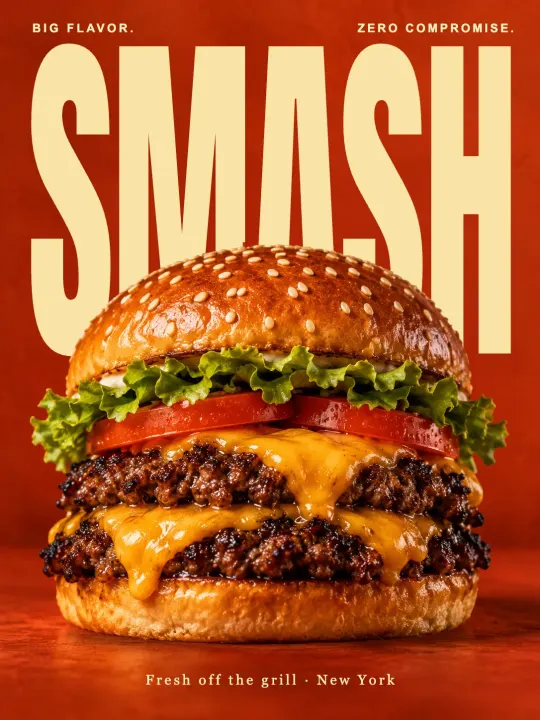 Before
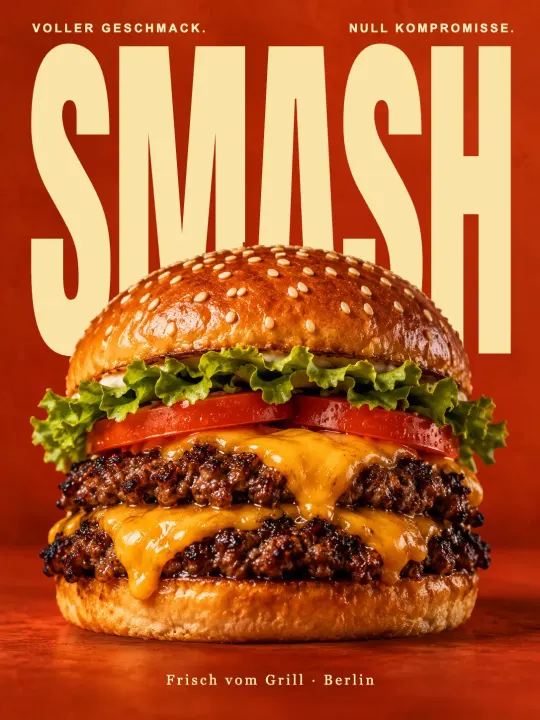 After
What people use it for
- Price and offer updates. “€29” becomes “€24”, “ends Sunday” becomes “ends Friday”, without rebuilding the layout.
- Localising a creative. Keep the photo and the design, retype the copy in another language, adjust the size so it fits.
- Resizing and reframing. Move the product, shrink the headline or remove a badge to make the same creative work in another placement.
- Reviving old winners. Last year’s best-performing ad is a flat export in a folder. Split it, refresh the copy, run it again.
- Marketplace and product images. Change the label on a product shot or lift the product onto a plain background.
How it works
- Upload the creative as PNG, JPG or WEBP (up to 10 MB). One credit per image, with a 10-credit pack and no subscription.
- Unlayers detects the text, the objects and the background and rebuilds each as its own layer. The area behind the text is filled in so the words are free to move.
- Edit in the browser: retype, restyle, move, resize, hide, reorder. Fonts come from a catalogue of web fonts matched to the original; you can change the font too.
- Export a PNG at the original size. The project stays saved for the next change.
Honest limits
The output is a PNG with your edits, not a PSD. Fonts are close matches rather than the exact licensed typeface, so compare them before you ship. Text over very busy areas and heavily overlapping elements may need a small manual touch-up in the editor. Clean, designed creatives give the best results; the free demo shows exactly what you get.
Frequently asked questions
Can Unlayers translate the ad for me?
No. You type the new copy, or paste it from your translator, into the text layers. That keeps you in control of the wording.
Will the export be sharp enough for Meta or Google ads?
The PNG is exported at the size of the image you uploaded, so start from the largest version of the creative you have.
Can I change several ads at once?
Each creative is converted separately and costs one credit. Once converted, you can duplicate the project for free and make as many versions as you need.