- Unlayers
- Edit text in an image
Edit text in a JPG or PNG online
A JPG or PNG has no text layer: the letters are baked into the pixels. Unlayers uses AI to find the text, lift it off the background and give it back to you as a real, editable text layer. Change a headline, a price or a date, keep the design, and export a new PNG. No Photoshop, no designer, no source file.
Try it free on the sample imageFree demo · No sign-up · 10 images for $9, no subscription
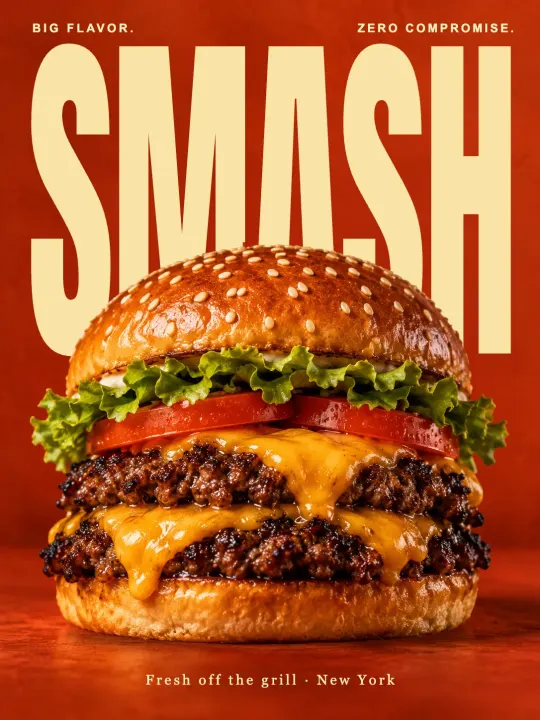 Before
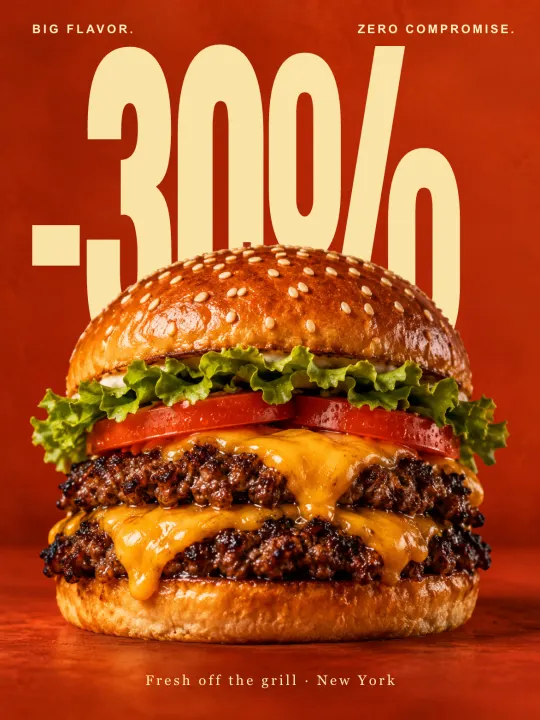 After
How to edit text in an image
- Upload the image. PNG, JPG or WEBP up to 10 MB: an ad, a poster, a product label, a social post you lost the original of.
- Let Unlayers split it. The model detects every piece of text, the objects and the background and rebuilds each as its own layer. The area behind the text is filled in, so the words are free to move. It usually takes a few minutes; you get an email when it is ready.
- Retype and restyle. Click a text layer, type the new words, pick another font, change the size, colour and alignment, move or resize it.
- Export. Download a PNG at the original size. Projects are saved, so you can come back and change the text again later.
What you can change
- The words themselves, including retyping an ad in another language.
- Font, weight, size, colour, letter spacing and alignment.
- Position: move text to a different part of the image, or hide it. To take words out altogether, see remove text from an image.
- Everything else on the image, because the objects and the background come out as layers too.
What to expect
Results depend on the image. Clean product shots and designed creatives give the best layers; busy photos with text over fine detail may need a small manual fix. Fonts are matched to the closest catalogue font, not the exact original, so compare them side by side before you export. Each converted image costs one credit; editing and exporting are free, and the free demo lets you try the editor first.
Frequently asked questions
Can I edit text in a scanned flyer or a photo of a sign?
Yes, as long as the text is readable. Low-resolution images produce rougher layers, so start from the largest version you have.
Does it work in languages other than English?
Yes. The text is detected as letters, so you can retype it in any language the chosen font supports.
Do I need an account?
No. You can buy a credit pack at checkout and start straight away; an account is created for you on this device.
Can I get a PSD?
Not yet. Unlayers exports a flat PNG with your edits. Each layer stays editable in the browser whenever you reopen the project.